A plumber cannot answer while under a sink. A salon administrator misses calls while checking in a client. A small clinic receives appointment requests after closing. The tempting response is an “AI receptionist that never misses a call.” The useful response is narrower: recover calls that would otherwise be lost, complete only well-defined tasks, and make escape to a person effortless.
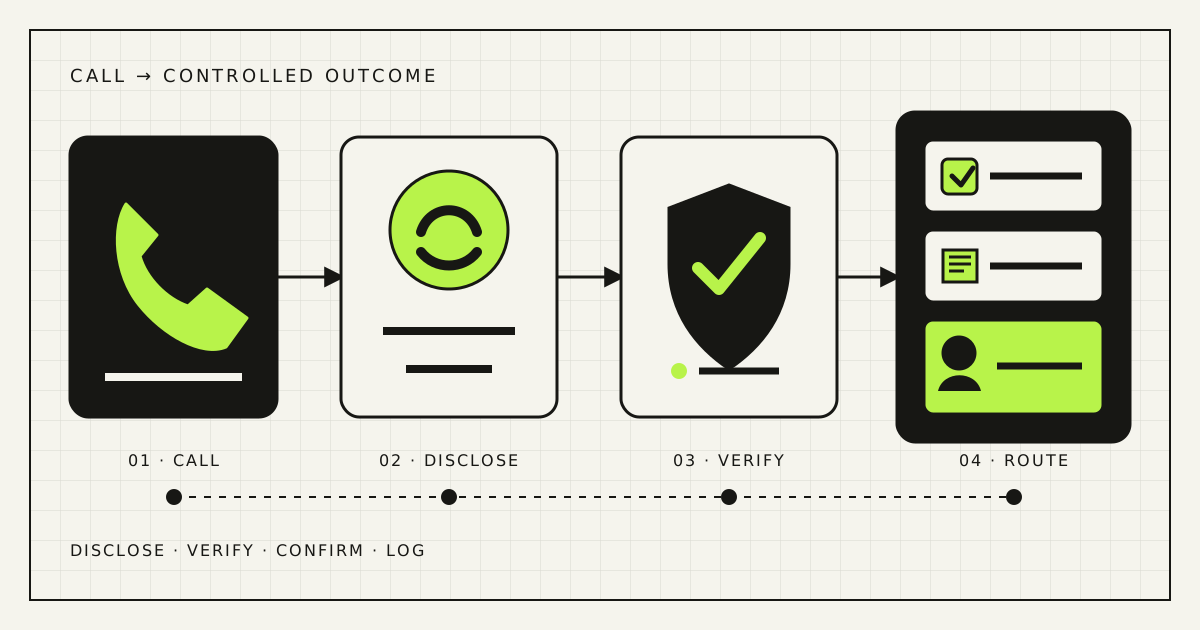
The best first deployment for most small businesses is after-hours or overflow coverage, not receptionist replacement. Let the system answer, disclose that it is automated, identify the caller’s need, and either complete one low-risk transaction or route the call. Prove it across 30 real conversations before adding more authority.
Decide whether voice automation fits
Voice is valuable when a phone call already begins a repeatable process: request a quote, check service coverage, book a standard appointment, confirm opening hours, or leave a structured message. It is a poor first target when most calls require diagnosis, negotiation, emotional judgment, regulated advice, or several internal decisions.
| Good first scope | Poor first scope |
|---|---|
| After-hours lead capture | Replacing every daytime call |
| Opening hours, address, and service area | Medical, legal, or financial advice |
| Booking one standard service | Complex rescheduling across teams |
| Collecting a callback request | Complaints, disputes, or vulnerable callers |
| Transferring by topic or urgency | Taking card details in open speech |
| Overflow while staff are busy | Outbound cold calling without a compliance review |
Start with the calls your team already fails to answer. This produces a clean comparison with voicemail or no answer and avoids disrupting the calls people handle well. It also keeps the business case honest: the system is recovering an operational gap, not pretending to replace all front-desk work.
Choose one service level
“Answer our calls” hides three very different levels of authority:
- Capture: identify the purpose, collect a name and callback method, summarise, notify the team. No system writes.
- Lookup: read approved information such as hours, service area, general pricing rules, or available appointment slots.
- Transact: create, change, or cancel something in a calendar, CRM, dispatch system, or order system.
Begin with capture plus a very small lookup set. Add one transaction only after it has deterministic rules. An agent may say that Tuesday at 14:00 appears free; creating the appointment is a separate permission. Cancelling an existing appointment is another.
Write an action contract before choosing a voice or model:
May answer:
- opening hours, location, service area
- approved service descriptions
- live availability returned by the calendar

May write:
- one provisional booking for a standard service
- one callback task with caller consent

Must transfer or take a message:
- complaint, emergency, exception, uncertainty
- price negotiation, refund, payment, sensitive advice
- caller asks for a person

Must never:
- invent availability, price, timing, or policy
- expose another customer's information
- continue after identity or consent is unclear
Map real calls before writing a prompt
Review two ordinary weeks of call logs. For answered calls, ask staff to mark the reason and outcome. For missed calls, check whether the person called back, sent a message, booked later, or disappeared. Do not import a dramatic “percentage of missed callers never return” from a vendor blog. Your own phone system can provide a defensible baseline.
Create a compact call map:
| Intent | Information needed | Valid outcome | Owner if blocked |
|---|---|---|---|
| New appointment | Service, location, preferred time, name, contact | Confirmed slot or callback | Administrator |
| Quote request | Job type, location, urgency, contact | Qualified callback task | Estimator |
| Existing booking | Reference plus identity check | Status or transfer | Administrator |
| General question | Approved knowledge card | Answer with source or message | Service owner |
| Complaint or emergency | Minimum routing details | Immediate transfer or priority alert | Named on-call person |
The blocked owner matters. “Someone will call you back” is not a workflow unless a named queue receives the task, a deadline is set, and failure is visible. The call summary should include what the caller requested, facts confirmed, missing information, promised next step, and recording or transcript reference where retained.
Design the call path
A practical system connects the business number to a telephony provider or SIP trunk, streams audio to a voice workflow, calls narrowly scoped tools, and returns speech. Current OpenAI documentation supports incoming telephone calls through SIP and separates two useful architectures: direct speech-to-speech for natural low-latency conversation, and a chained speech-to-text, reasoning, and text-to-speech path for stronger control over intermediate text. Twilio documents bidirectional media streams for carrying phone audio to and from an AI application.
Business number → disclosure → intent and language → approved knowledge/tools → confirm → book, capture, or transfer → summary and outcome log.
Choose direct speech-to-speech when interruption, pace, and natural turn-taking dominate. Choose a chained pipeline when the business needs durable transcripts, explicit policy checks, or deterministic validation between hearing and replying. A hybrid is common: natural audio for conversation, but every calendar or CRM action passes through ordinary application code.
Build for failure. If the model, calendar, network, or transfer target is unavailable, the caller should reach a short fallback: collect a number with consent, offer a text booking link, route to voicemail, or play the actual opening hours. Silence and repeated apologies are not a fallback.
Make booking a controlled transaction
A calendar integration is where an impressive demo becomes an operational system. The model should not “remember” availability from the conversation. It should query the live calendar, pass structured options to the caller, and request a booking only after confirmation.
- Resolve service: map the caller’s request to one supported service code, duration, staff group, location, and preparation rules.
- Read availability: query free/busy for the correct calendar, time zone, buffers, working hours, and notice period.
- Offer choices: read at most two or three slots. Do not recite a screenful of times.
- Confirm details: repeat the date, local time, service, location, name, and contact method.
- Write once: create the event with an idempotency key or unique request ID so retries cannot double-book.
- Reconcile: read the created event back, send a confirmation, and report any mismatch to the team.
Use a provisional hold if concurrent booking volume makes race conditions likely. Separate “no availability” from “calendar unavailable.” The first can offer another day; the second must not invent slots. Google Calendar exposes separate free/busy and event-insert operations, which is the right conceptual separation even if your business uses another calendar.
Changes and cancellations need stronger verification than new bookings. Do not read out an existing appointment based only on a caller-supplied name. Use a booking reference plus a second attribute, send a secure link, or transfer to staff according to the sensitivity of the service.
Design for a telephone, not a chat window
Callers cannot scan a previous paragraph. Voice design must be short, recoverable, and explicit.
- Disclose early: “Hello, I’m Rendframe Clinic’s automated assistant. I can help with appointments or take a message.” Adapt the wording to the business and applicable law.
- Ask one thing at a time: service, then location, then time. Long compound questions create incomplete answers.
- Allow interruption: callers naturally speak over prompts. Test barge-in and make sure the system stops talking.
- Confirm fragile data: names, phone numbers, email addresses, dates, amounts, addresses, and negation.
- Handle language explicitly: let the caller choose or switch language; test Ukrainian, Russian, English terms, surnames, street names, and code-switching on real phone audio.
- Offer a person without friction: “operator,” “person,” or repeated misunderstanding should trigger transfer or callback, not another sales pitch.
Phone audio is narrower and noisier than a studio sample. Test speakers in cars, on job sites, through poor mobile connections, with background television, accents, quiet speech, and overlapping voices. Measure errors that change the business outcome, not whether the voice sounds charming.
Protect callers, data, and the business
For EU-facing deployments, Article 50 of the EU AI Act requires providers to design AI systems that interact directly with people so those people are informed they are interacting with AI, unless it is obvious in context. The provision applies from 2 August 2026. Rendframe’s AI Act transparency checklist covers implementation in more detail. Recording, transcription, marketing, biometric, employment, health, and sector rules may add separate obligations; obtain qualified advice for the jurisdictions and use case.
Disclosure is only the visible layer. Map where audio, transcripts, summaries, phone numbers, calendar records, and logs travel. Define processor, region, access, retention, deletion, incident owner, and whether content is used for model training. Keep only what the business can justify.
Use narrow tool permissions. The appointment agent should see available slots, not the director’s full calendar. The callback tool can create a task but should not export the CRM. Never collect full payment-card details through an open generative conversation; route to a compliant payment flow or person. Validate signed webhooks from telephony and model providers, rate-limit tools, and keep a kill switch that returns the number to the previous call route.
NIST’s Generative AI Profile recommends documented pre-deployment testing and ongoing monitoring. For a voice system, that means preserving enough trace data to reconstruct an error: call ID, detected intent, tool inputs and outputs, confirmations, transfer attempts, final outcome, and system version—without keeping unnecessary personal data forever.
Calculate the real operating cost
A monthly platform fee is not the total. Voice cost often combines phone number and telephony minutes, audio or model usage, transcription, text-to-speech, calendar or CRM connectors, messaging confirmations, storage, monitoring, and human review.
Monthly voice cost =
  phone and call minutes
  + model and audio processing
  + messages and integrations
  + monitoring and storage
  + staff review and maintenance

Recovered contribution =
  additional completed appointments
  × show rate
  × contribution per completed appointment
Compare recovered contribution, not booked revenue, with the full operating cost. Include no-shows, duplicate bookings, refunds, staff correction time, and calls that still need a callback. If the system only captures messages, compare it with voicemail plus the team’s current callback process. The Rendframe automation ROI guide provides a fuller cost and sensitivity model.
Run the 30-call pilot
Use three gates of ten calls. Thirty is enough to expose basic workflow failures, not enough to prove universal reliability.
- Ten scripted calls: staff test ordinary intents, interruptions, silence, language changes, wrong details, calendar failure, transfer failure, prompt injection, and a request the system must refuse.
- Ten after-hours calls: route real calls that would otherwise reach voicemail. Review every transcript, recording where lawful, tool trace, summary, and next-day outcome.
- Ten overflow calls: activate only when staff do not answer within the agreed time. Keep booking narrow and make human takeover available.
| Metric | How to measure | Stop condition |
|---|---|---|
| Useful answer rate | Calls ending in valid answer, message, booking, or transfer ÷ eligible calls | Falling below voicemail baseline |
| Booking accuracy | Correct service, person, date, time, location, and contact | One uncorrected wrong booking |
| Capture completeness | Callback tasks with all required fields | Team cannot act on the summary |
| Transfer success | Connected or confirmed callback ÷ required handoffs | Urgent call reaches an unowned queue |
| Critical speech errors | Wrong name, number, date, address, amount, or negation | Private data or consequential error exposed |
| Caller friction | Repeats, hang-ups, requests for a person, and time to useful outcome | Repeated loops or no escape |
| Cost per useful outcome | Full pilot cost ÷ valid outcomes | Worse economics without a service gain |
Set thresholds before the pilot. Require 100% correct handling of blocked actions, disclosure, identity gates, and transfer requests. Booking and contact fields must be read back and confirmed. Return to capture-only mode after any cross-customer disclosure, unauthorized action, wrong consequential booking, or missing urgent escalation.
Choose packaged or custom
A packaged AI receptionist is appropriate when the business uses a common calendar, one location, standard services, modest call logic, and accepts the vendor’s numbers, voices, data controls, and integrations. It is the fastest way to test whether callers will use the flow.
Custom implementation becomes reasonable when the agent must handle several languages, legacy or regional telephony, multiple locations, dispatch rules, a custom CRM, special verification, data residency, audit requirements, or differentiated call logic. “Custom” should mean owned workflow rules and integrations—not a permanently bespoke model with no operational support.
In both cases, ask the same questions: Can we export transcripts and outcomes? Can we inspect tool calls? Who controls retention? Can a person take over live? What happens during provider failure? Can we return the number to the old route in minutes? Which changes require vendor support?
The defensible product is not a human-sounding demo. It is a measured call operation with explicit authority, reliable booking, clean handoff, and an exit path. Rendframe designs multilingual voice workflows around existing telephony, calendars, CRM, privacy constraints, and service rules. See Rendframe’s business AI automation service or bring a two-week call log to a discovery call.
Frequently asked questions
What is an AI voice receptionist?
It is software that answers a phone call, understands speech, responds by voice, and may use approved business tools to capture a message, look up information, book an appointment, or transfer the caller.
Should a small business replace its receptionist with AI?
Usually not as a first step. Start with missed calls, after-hours calls, or overflow while people retain exceptions, sensitive conversations, payments, complaints, and uncertain cases.
Can an AI receptionist book appointments safely?
Yes, if availability comes from the live calendar, booking rules are deterministic, details are read back, duplicate writes are prevented, and uncertain or conflicting requests go to a person.
Does the caller need to know it is AI?
For EU-facing use, Article 50 of the AI Act requires people interacting directly with an AI system to be informed unless that is obvious in context. Other disclosure and recording rules may also apply.
How should we test an AI phone agent?
Benchmark current calls, run scripted edge cases, then pilot after-hours or overflow traffic. Review every transcript and outcome before expanding scope or enabling more write actions.
Sources and further reading
- OpenAI: Voice agents architecture guide
- OpenAI: Realtime API with SIP
- Twilio: Media Streams overview
- Google Calendar API: Freebusy query
- Google Calendar API: Events insert
- EUR-Lex: EU Artificial Intelligence Act
- NIST AI 600-1: Generative AI Profile
- McKinsey: Agentic AI in customer care
- Brynjolfsson, Li, and Raymond: Generative AI at Work