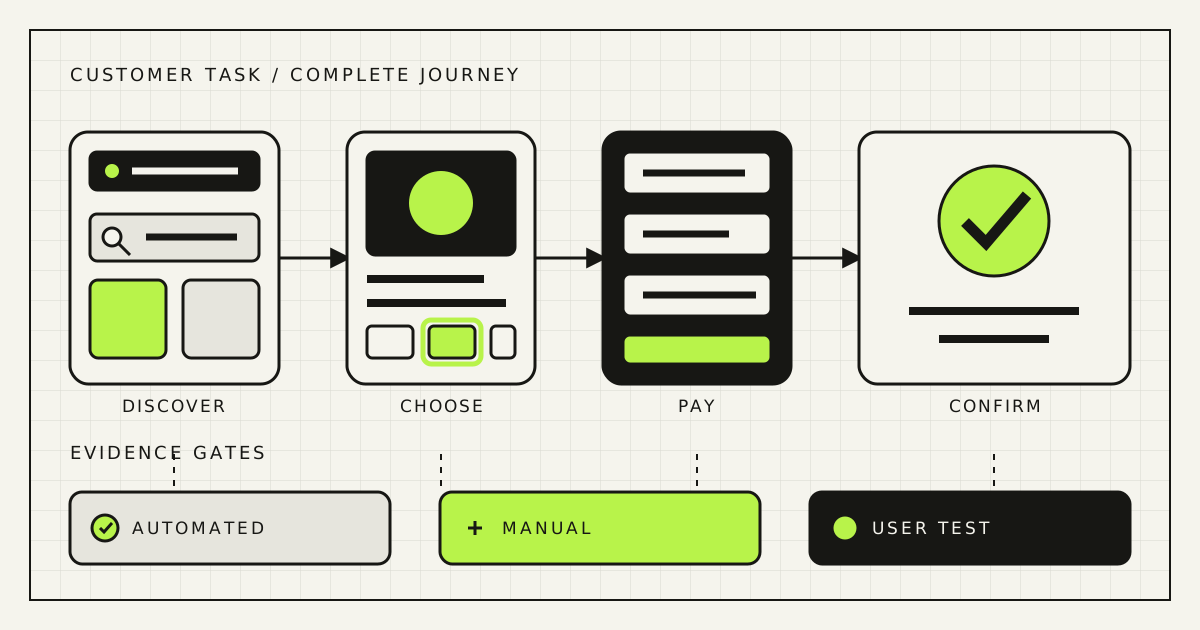
An accessible online store is not a homepage with good contrast. A customer must be able to discover a product, understand it, choose a variant, recover from an error, authenticate, pay, and receive confirmation without a mouse, perfect vision, or guesswork.
The short answer
For an ecommerce accessibility audit, define the markets, legal entities, service, and applicable national rules first. Then test representative end-to-end purchase journeys against a documented technical baseline, using automated checks, keyboard-only operation, zoom and reflow, screen readers, manual review, and—where practical—people with disabilities. Fix barriers that stop a customer completing a task before polishing isolated scores.
The European Accessibility Act, Directive (EU) 2019/882, applies through national implementing laws. Its application date was 28 June 2025, and ecommerce services are expressly in scope. It requires covered services to be perceivable, operable, understandable, and robust, including identification, security, and payment functions supplied as part of the service. That makes accessibility an operating property of the store—not a one-time design task.
Determine EAA scope without shortcuts
Start an applicability sheet before promising compliance. Record each selling entity, the consumer markets served, websites and mobile apps, checkout and payment providers, support channels, products or services sold, national implementing laws, and the person responsible for the conclusion. Cross-border stores may face different authorities and procedures even though the directive harmonises core requirements.
The directive exempts microenterprises providing services, but do not reduce that to “small business means exempt.” The EU definition considers staff and financial thresholds, ownership relationships can affect the calculation, and national law controls implementation. There are also provisions for fundamental alteration and disproportionate burden; they require a reasoned assessment, not a preference to postpone difficult work. Get legal advice for the scope decision.
Even where an exemption applies, the commercial case can remain. Keyboard access, clear errors, legible text, predictable forms, and resilient checkout help customers using assistive technology, older customers, temporary injuries, slow devices, and anyone trying to pay under pressure. Treat legal scope and product quality as related decisions, not the same question.
Separate the legal conclusion from the engineering baseline
The directive states functional requirements. National laws, applicable harmonised standards or technical specifications, contracts, and sector guidance determine the conformity route. WCAG 2.2 is a widely used, testable web-content standard and a strong engineering baseline. “We passed WCAG 2.2 AA checks” and “our service complies with every applicable EAA obligation” are not automatically equivalent claims.
Write a short audit charter: scope, baseline and version, conformance target, browsers, devices, assistive technologies, languages, test accounts, third-party boundaries, sampling method, known exclusions, evidence format, and retest date. If a payment iframe or identity provider is essential to purchase, labelling it “third party” does not make the customer barrier disappear. Record who can fix it and what fallback exists.
Sample journeys and states, not convenient pages
A homepage scan misses most commerce risk. Select complete processes: search to product, category filters, product options, cart updates, guest checkout, account checkout, discount or gift card, delivery selection, payment challenge, order confirmation, cancellation or return, and support. Include an out-of-stock item, validation error, declined payment, expired session, and loading state.
Choose templates and content that expose variation: a simple product, a configurable product, a product with a video or PDF, long Ukrainian or German copy, a sale price, a marketplace seller, and a page built by the CMS team. Test mobile and desktop at minimum. If the store has native apps, audit them as products in their own right rather than assuming the responsive website result transfers.
The 12-test ecommerce accessibility audit
| Test | What to do | Typical failure |
|---|---|---|
| 1. Keyboard path | Complete every journey with Tab, Shift+Tab, Enter, Space, arrows, and Escape | Filter, variant picker, modal, or payment control cannot be operated |
| 2. Focus | Track visible focus, logical order, modal entry and return | Focus disappears behind sticky UI or is lost after cart updates |
| 3. Semantics | Inspect headings, landmarks, labels, names, roles, states, and values | A custom control looks correct but has no usable programmatic identity |
| 4. Contrast | Check text, controls, focus indicators, icons, errors, and selected states | Sale copy passes while the checkout checkbox or error does not |
| 5. Zoom and reflow | Increase text and zoom; test narrow viewport and orientation | Price, close button, or order total is clipped or overlapped |
| 6. Non-text content | Review product-image alternatives, charts, icons, audio, video, and PDFs | Colour or imagery carries material product information with no equivalent |
| 7. Catalog truth | Check accessible product, compatibility, safety, and service information | The store receives accessibility information but omits it from the listing |
| 8. Search and filters | Use suggestions, filters, sorting, pagination, and empty results without sight | Result count changes silently or active filters cannot be identified |
| 9. Forms and recovery | Submit empty, invalid, and corrected address, account, and checkout forms | Error colour appears, but focus, summary, field association, or correction path is missing |
| 10. Identity and payment | Test login, MFA, CAPTCHA alternatives, wallet, card fields, and 3-D Secure | A security challenge creates a dead end for screen-reader or keyboard users |
| 11. Dynamic messages | Trigger cart, stock, price, validation, and loading updates | Visual toast announces success while assistive technology receives nothing |
| 12. Content and support | Review plain language, instructions, policies, chat, help desk, and alternatives | The interface is operable but the customer cannot understand terms or request help accessibly |
Automate what is deterministic: missing names, invalid relationships, certain contrast failures, document language, duplicate IDs, and selected component rules. Keep these checks in development and CI. But the W3C evaluation guidance is explicit that no tool alone can determine whether a site meets accessibility standards. A zero-error dashboard is not an audit result.
Run one real purchase with assistive technology
Start with keyboard-only operation while keeping the pointer out of reach. Narrate where focus goes and whether the next action is predictable. Then use at least one screen reader and browser combination relevant to the customer base. Listen to the interface instead of watching it: product options should expose name, state, price consequences, and errors; the order total should update; headings should make the page scannable; and the confirmation should be unambiguous.
Do not stop at a sandbox card success. Test a declined transaction, an extra authentication challenge, a changed delivery option, an expired discount, and a cart price update. Preserve entered data when safe, identify the error in text, associate it with the field, move or announce focus appropriately, and explain how to recover. For purchases that create a legal or financial commitment, review and correction before submission deserve special attention.
Language is part of the test. Set the correct page language, mark genuine language changes, localise control names and errors, and check that translated text still fits at zoom. A Russian label embedded in an otherwise Ukrainian flow is not only editorial debt: it can change pronunciation in a screen reader and make the action harder to understand.
Prioritise by blocked customer task and recurrence
Give every finding a reproducible path, expected result, actual result, affected component, tested configuration, standard reference, screenshot or recording, owner, fix, and retest state. Avoid a single opaque “accessibility score.” It hides whether 20 warnings are minor content defects or one keyboard trap prevents every purchase.
- P0 — transaction blocked: no accessible way to select, authenticate, pay, or recover. Provide a safe fallback and fix immediately.
- P1 — major loss of information or control: a common journey is severely harder, ambiguous, or unreliable.
- P2 — local barrier: the task remains possible but requires avoidable effort or workaround.
- P3 — improvement: useful usability or maintainability work with limited immediate impact.
Multiply severity by recurrence. One defect in a shared input, modal, price component, or design token may affect thousands of states and three storefronts. Fixing the primitive is usually more valuable than patching screenshots page by page.
Make accessibility a release property
Add accessible states to design-system documentation: default, hover, focus, disabled, selected, error, loading, success, and empty. Define semantic HTML first, then ARIA only where native elements cannot express the interaction. Include keyboard behavior, announcements, touch target expectations, zoom, reduced motion, and content constraints in component acceptance criteria.
At pull request time, run linting and browser checks on changed components and critical journeys. For every release, keep a short manual keyboard and zoom suite. On a schedule and before major checkout changes, repeat the representative screen-reader journeys and involve users with disabilities. Track barrier escape rate, time to fix, recurrence by component, and completion of critical tasks—not just the count of automated violations.
Include vendors in the release gate. Ask payment, chat, review, consent, and identity providers for current accessibility documentation, tested configurations, known issues, remediation contacts, and contractual change notices. Maintain a replacement or accessible assisted route for an essential integration you cannot repair yourself.
A 30-day remediation plan
Do not spend week one installing an overlay and declaring the problem solved. Browser-side widgets cannot reliably repair underlying semantics, keyboard behaviour, third-party checkout, content, or operational ownership. Use the first month to remove real barriers and create a repeatable evidence trail.
State limits honestly and keep evidence current
An audit is dated evidence from a defined sample and configuration. It is not a timeless certificate. New products, promotions, CMS content, payment releases, consent tools, and experiments can introduce barriers tomorrow. Record version and date, retain test artefacts, assign retests, and publish only claims the evidence supports.
The directive also expects covered service providers to make information available explaining how the service meets applicable accessibility requirements. The exact format and content depend on national implementation. Build the factual input from the audit—service description, applicable requirements, how they are met, known limitations, contact route, and update process—then have the responsible legal owner review the public statement.
The 2026 WebAIM Million detected an average of 56.1 automated accessibility errors on one million homepages, while warning that absence of detected errors does not establish accessibility. Use that as a signal that regressions are common, not as a benchmark for your store. The only useful target is that customers can complete the important tasks and that the organisation can demonstrate, maintain, and improve the result.
Frequently asked questions
Does the European Accessibility Act apply to online stores outside the EU?
It may apply when an ecommerce service is offered to EU consumers, but the selling entity, market, service, exemption, and national implementing law matter. Confirm scope with qualified counsel.
Is WCAG 2.2 AA enough for EAA compliance?
It is a strong technical baseline, not an automatic legal conclusion. Map it to applicable national law, standards, service obligations, third parties, documentation, and operational processes.
Can an automated scanner certify an ecommerce site?
No. Automation catches a useful subset. Keyboard, screen-reader, zoom, content, error recovery, complete-process, and user testing require human evaluation.
Where should an accessibility audit start?
Start with the highest-value complete journey: product discovery through a successful and failed payment. Fix blockers in shared components before widening the sample.
How often should an online store be retested?
Run automated checks continuously, a small manual suite for releases, and broader journey-based testing on a schedule and after material checkout, theme, CMS, or vendor changes.
Rendframe can map critical commerce journeys, audit the technical implementation, repair shared components and checkout, add regression tests, and hand over an evidence-based backlog. Legal scope and conformity opinions remain with your counsel. See how we build reliable ecommerce systems or send the storefront, markets, and checkout providers for an initial accessibility review.
Continue: compare accessibility barriers with the wider checkout-friction audit, ask better questions before appointing a development partner, or make accessibility part of product engineering.