When a cloud application fails, the first surprise is often not the outage. It is discovering that the customer list exists only in the CRM, the status page requires the unavailable company login, or yesterday's export cannot be turned back into a working process.
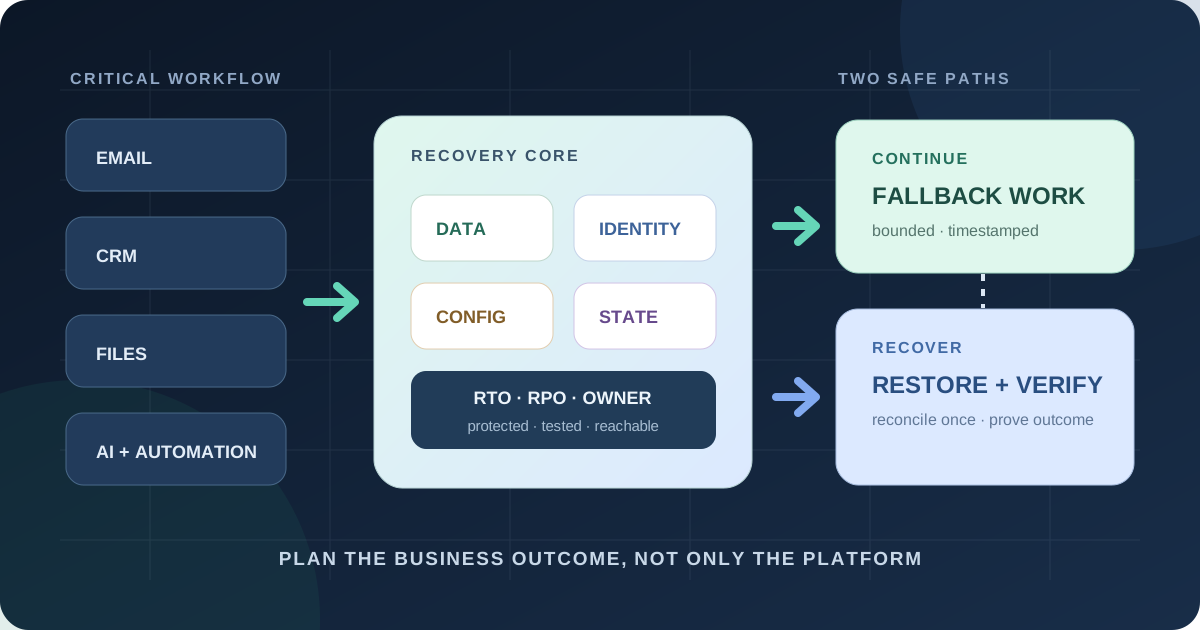
A useful SaaS disaster recovery plan starts with one business workflow, not a list of vendors. Set the maximum acceptable interruption and data loss, protect the data, identity, configuration and integration state needed to recover, create a small manual fallback, and prove both paths in a timed exercise.
Why SaaS continuity still belongs to the customer
Reliable cloud infrastructure reduces many risks; it does not remove the need for a customer plan. The UK Business Data Survey 2026 found that 20% of surveyed businesses storing or processing data away from their premises said a server or cloud outage had affected them in the previous 12 months. That result describes 1,330 UK respondents, not every market, but it makes downtime a normal planning scenario rather than an exotic disaster.
Microsoft documents redundancy, monitoring and recovery inside Microsoft 365, while also describing service continuity as a partnership with the customer. The distinction matters. A provider can restore its platform while your team still cannot sign in, reconstruct a deleted pipeline stage, replay missed webhooks, contact today's customers, or explain which orders need attention.
Adding AI tools increases the number of dependencies. An assistant may rely on a model provider, identity service, vector store, CRM, email account and automation platform in one workflow. If one component fails or changes, “the AI is online” says little about whether the business process works. Treat the workflow—and its customer outcome—as the unit of continuity.
Define recovery outcomes before buying backup
Choose a critical workflow such as receiving sales enquiries, fulfilling paid orders, answering urgent support cases, approving invoices or publishing a product update. Ask what happens after 15 minutes, two hours, one day and three days without it. Revenue delay, contractual exposure, safety, customer harm and reconstruction effort should determine the recovery tier.
Write two targets in plain language:
- Recovery time objective (RTO): how long the workflow may remain unavailable before the impact becomes unacceptable.
- Recovery point objective (RPO): how much recent data the business can afford to reconstruct or lose.
NIST defines RTO around the time a system can stay in recovery before harming the mission or business process. Do not copy a fashionable number. “RTO four hours” is fiction if the only administrator is unreachable or the export takes two days. Record the tested result beside the target, plus the temporary service level the fallback can support.
| Workflow | Illustrative RTO | Illustrative RPO | Fallback |
|---|---|---|---|
| Urgent support intake | 30 minutes | One message | Public alternate address and offline escalation list |
| Paid-order fulfilment | 2 hours | 15 minutes | Read-only paid-order queue; no duplicate shipment |
| Sales pipeline | 4 hours | One hour | Minimal lead sheet with owner and next action |
| Content archive | 3 days | 24 hours | Pause publishing; restore verified snapshot |
These are examples, not standards. A clinic, factory or regulated financial firm needs different analysis and professional requirements. Small businesses still benefit from honest tiers: not everything deserves instant recovery, and “everything is critical” produces no priority.
Map the workflow, not just the SaaS logo
Draw the path from trigger to completed customer outcome. For an online order this may include storefront, identity, payment provider, fraud decision, order database, inventory, warehouse notification, carrier label, customer email and accounting export. Mark the system of record for each fact and the owner of each handoff.
For every dependency, capture six recoverable assets:
- Data: records, files, messages, attachments and history.
- Identity: administrator accounts, recovery methods, service identities and emergency access.
- Configuration: fields, roles, routing rules, templates, domains and policy.
- Integration state: API credentials, webhook destinations, cursors, idempotency keys and failed-event queues.
- Business logic: automation definitions, prompts, knowledge sources, code and model settings.
- Evidence: audit logs, invoices, consent records and the timeline needed to reconcile.
A CSV of contacts protects only part of the CRM. It may omit attachments, ownership, custom fields, workflow definitions, permissions and relationships between objects. A restore is successful only when the chosen workflow produces a correct outcome, not when a file exists in storage.
Plan for four different failure modes
1. Provider outage
The vendor is unavailable but your account and data may be intact. Use a trusted status source that does not depend on the affected login. Activate a bounded manual process, timestamp every temporary record, and avoid speculative retries that can create duplicate orders or messages when service returns.
2. Identity or administrator lockout
The service works, but your people cannot reach it. Maintain at least two appropriately protected administrators, recovery contacts controlled by the business, documented domain and DNS access, and an emergency-access procedure. Test it without sharing passwords or weakening multifactor authentication.
3. Deletion, corruption or account compromise
The platform is available, yet live data or configuration cannot be trusted. Stop destructive automations, preserve logs, define the clean recovery point, and restore into an isolated or alternate location where possible. CISA recommends encrypted offline backups of critical data and regular integrity and recovery testing; the NCSC adds that cloud backups are not ransomware-resistant by default.
4. Vendor exit, suspension or incompatible change
This is migration, not instant restore. You need usable exports, data dictionaries, configuration records, contract and billing ownership, replacement options and enough time. Google says a full Workspace organisation export is available no earlier than 48 hours after starting, usually takes 72 hours and may take up to 14 days. That tool can support portability; it is not a one-hour continuity path.
Backup, retention, sync, and export are not interchangeable
| Mechanism | Useful for | Common limit |
|---|---|---|
| Version history or recycle bin | Fast recovery of recent user mistakes | Finite retention; same account and security domain |
| Retention or legal hold | Preserving records for policy, search or evidence | May not recreate an operational workflow |
| Synchronization | Availability and convenient local access | Deletion or encryption may propagate |
| Export | Archive, inspection and vendor migration | Slow, partial, or difficult to re-import faithfully |
| Recovery backup | Repeatable restoration to a chosen point | Needs protected credentials, scope and tested restore |
Read each vendor's current retention, export and restore documentation. Test representative objects—including relationships and permissions—rather than accepting “full backup” as a complete specification. Record encryption, storage region, immutability or deletion protection, administrator separation, audit logs, export formats, API limits and what happens when the SaaS account itself is suspended.
Backup integrations often require broad read access. The NCSC specifically treats backup and eDiscovery integrations that can read all users' data as high risk and recommends administrative approval. Protect the recovery system as a second high-value environment: separate credentials, least privilege, strong authentication, alerts and a path to revoke access.
Use three recovery tiers to spend wisely
| Tier | Business rule | Typical protection | Test |
|---|---|---|---|
| A — continue now | Hours of interruption cause material harm | Frequent protected copy, independent access, live fallback queue | Quarterly timed restore and workflow exercise |
| B — restore today | One business day is tolerable | Daily copy or export, configuration register, documented re-import | Quarterly sample restore |
| C — preserve | Long interruption is acceptable; history still matters | Periodic archive with integrity and ownership checks | Semiannual retrieval test |
Put each workflow and dataset in one tier. Include an owner, deputy, RTO, RPO, copy frequency, retention, fallback capacity, restoration sequence and last test evidence. Review the tier when a tool begins accepting payments, becomes the only customer channel, gains an AI agent, or accumulates records needed for tax, contracts or support.
Write a runbook that works without the failed system
Store the emergency runbook in a location reachable when the primary identity provider, file drive or password manager is unavailable. A protected printed copy or separately controlled read-only copy may be appropriate for the small set of essential instructions. Never put live passwords or recovery codes in an ordinary document.
- Declare: exact trigger, incident lead, deputy and decision log.
- Verify: trusted vendor status, account state, scope, start time and customer impact.
- Contain: pause risky integrations and automated writes without destroying evidence.
- Continue: start the minimum fallback; label temporary records and enforce duplicate controls.
- Recover: select a clean point, restore in dependency order and validate permissions and totals.
- Reconcile: replay or manually enter queued work once; resolve conflicts; notify affected people.
- Learn: record actual RTO/RPO, failed assumptions, owner and due date for each fix.
Pre-write two messages: one for staff and one for customers. Say which function is affected, what still works, which workaround is safe, what people should not retry, and when the next update will arrive. Do not announce a cause or restoration time until evidence supports it.
Run a 90-minute continuity and restore drill
Use synthetic or sanitized data. Simulate one concrete loss: the shared support inbox is unavailable, 50 CRM records were deleted, or an automation wrote the wrong status. The observer records times, decisions and evidence. Do not touch production unless the exercise is explicitly designed and approved for it.
Pass only if the team reaches the defined business outcome inside the target, proves which records were recovered, preserves authorization and privacy, and reconciles temporary work without duplication. “We found the backup” is not a pass.
Evaluate tools against a restore, not a feature page
Before buying a backup or continuity product, give the supplier a representative recovery script. Ask them to demonstrate one item, a related group of records, a user's full workspace and an alternate-location restore. Check preserved metadata, permissions, links, attachments, version history and audit evidence. Measure extraction and restoration time at realistic volume.
Also test failure of the recovery vendor: can you export the protected copy in documented formats, who owns the storage and encryption keys, how is a compromised administrator contained, and how do you recover after contract termination? Price the whole protected scope, storage, API consumption, restore charges, support and testing—not only the per-user headline.
A small business may accept native recovery for lower-tier tools and invest in independent protection only for critical workflows. The decision should follow impact, native capability and a test. Avoid buying a second dashboard that nobody owns.
Frequently asked questions
Does a SaaS provider back up my business data?
Providers protect their platforms, but recovery features, retention, scope, and customer responsibilities vary. Document what can be restored, for how long, by whom, and test it.
What is the difference between SaaS backup and data export?
A backup supports repeatable point-in-time recovery. An export is usually a portable snapshot for archive or migration; it may be slow and may not preserve relationships or configuration.
What RTO and RPO should a small business use?
Set them per workflow from business impact. A sales inbox may need a one-hour workaround; an archive may tolerate days. Targets must match tested capabilities and budget.
How often should a SaaS recovery plan be tested?
Run a focused restore or continuity test at least quarterly for critical workflows and after material changes to vendors, permissions, integrations, or data structures.
What should a SaaS outage runbook contain?
Trigger criteria, owner and deputy, trusted status links, fallback process, read-only contact and work queues, recovery steps, validation checks, communications, and reconciliation.
Sources and verification date
Verified 12 September 2026 against the UK government's Business Data Survey 2026; NIST's contingency planning guide and RTO definition; CISA's ransomware guide; the NCSC's ransomware-resistant backup principles and SaaS security guidance; Microsoft's service health and continuity documentation; and Google's Workspace organisation export documentation. Vendor features and limits change; verify them for your edition and region.
Rendframe can map a critical workflow, engineer exports and protected recovery paths, remove fragile integrations, and run a timed continuity exercise. Start with the tool-stack audit, review resilient workflow automation, or send us one workflow that the business cannot afford to lose.