The chat bubble, analytics tag, review badge, video player, payment widget, and A/B test all arrived as small improvements. Together they became an unowned software supply chain running inside every customer’s browser.
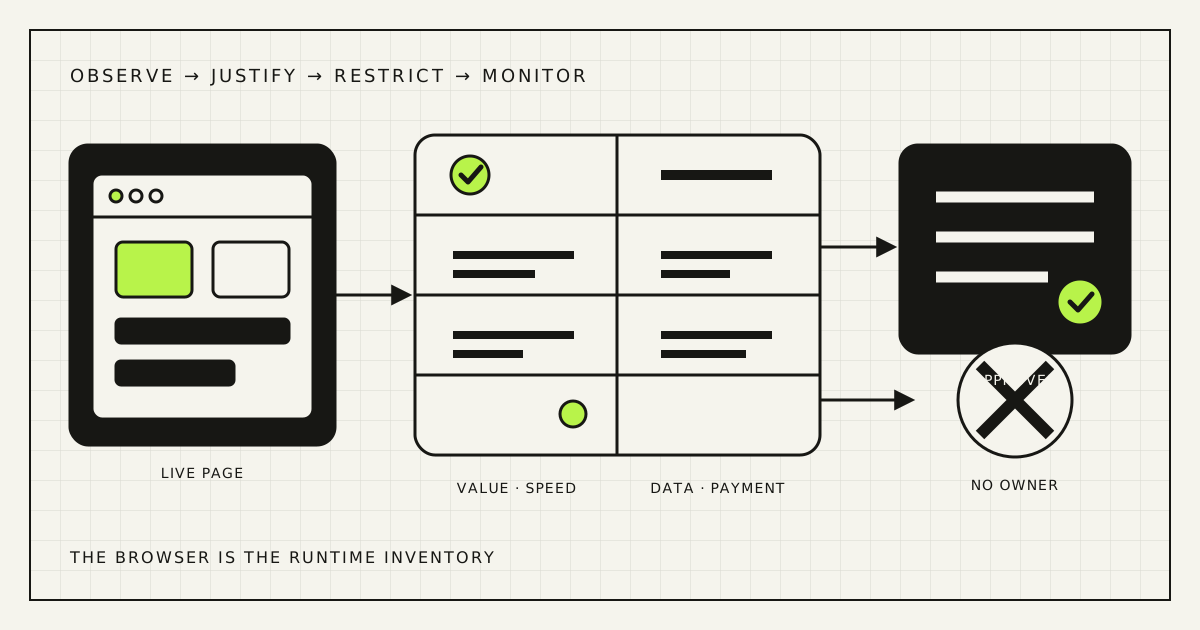
Do not begin by installing another scanner. Begin with a live inventory and one business question: which external code must run for this page to do its job? The answer is rarely “everything currently in the tag manager.”
One script creates four kinds of risk
A third-party script is code your page loads from, or on behalf of, another provider. It may render a booking calendar, measure advertising, detect fraud, translate content, or start a support chat. It can also make more requests, load further vendors, read page content available to JavaScript, delay interactions, change without your deployment, and stop responding when its provider has an incident.
This is normal web architecture, not evidence of wrongdoing. The 2024 Web Almanac analysis found third-party resources on 92% of pages in its dataset; scripts were the largest category of third-party requests. Its JavaScript chapter measured a median 375 KB of third-party JavaScript on mobile pages. Those are population statistics, not a performance budget for your site.
| Question | Evidence | Business effect |
|---|---|---|
| Does it help? | Feature use, assisted conversions, support outcomes | Revenue or operating value |
| Does it slow the page? | Requests, bytes, main-thread time, field metrics | Delayed browsing and checkout |
| Where does data go? | Network destinations, payloads, storage, consent state | Privacy and vendor risk |
| What if it changes? | Owner, version, integrity control, alerts, fallback | Security and availability |
A speed audit that ignores data flows is incomplete. A cookie banner that ignores runtime requests is incomplete. A security review of source code alone misses tags injected after the page loads. The same browser trace should inform all four conversations.
Choose pages and consent states before choosing tools
Do not scan only the homepage. Make a small matrix of pages where trust, money, or personal data changes hands: landing page, product page, search, cart, checkout, order confirmation, sign-in, account, contact form, and booking flow. Add meaningful templates rather than every URL.
Then test each template in the states a real visitor can occupy:
- new visitor before any optional consent;
- visitor who rejected optional categories;
- visitor who accepted the relevant categories;
- signed-in customer, where applicable;
- mobile device on a slower network and modest CPU;
- checkout with the real payment method, test account, and fraud tooling.
A tag that is absent from HTML may be injected by a tag manager after an event. A vendor may load different code by geography, device, campaign, or consent. One Lighthouse report is therefore a sample, not an inventory.
Build the inventory from what the browser executes
Use Chrome DevTools or another instrumented browser to preserve a network log while loading and using the page. Record scripts, frames, beacons, XHR/fetch calls, fonts, and unexpected redirects. The Initiator column matters: it shows which resource summoned the next one. Export a HAR file for analysis, but treat it as sensitive because URLs and payloads can contain identifiers or test data.
Google’s third-party JavaScript guidance recommends combining Network and Performance-panel evidence, grouping work by third party, then blocking suspected domains and measuring again. This reveals indirect inclusion chains that a search through templates will not.
Page: /checkout
Observed script: https://vendor.example/sdk.js
Loaded by: tag-manager container v42
Purpose: abandoned-checkout analytics
Consent state: marketing accepted
Data sent: order value, currency, campaign ID
Owner: growth lead
Last approved: 2026-08-29
Fallback: checkout works without it
Decision: remove from payment step; fire after order if needed
Store the inventory next to normal operational documentation, not in one developer’s browser history. Include provider, hostname, pages, purpose, owner, loading method, consent category, data fields, performance cost, expiry or review date, and removal procedure.
Make every script justify itself on every page
“Marketing uses it” is not a business justification. Ask which decision would become worse without the script. If an A/B platform has run no experiment for six months, a heatmap has no active research owner, or two analytics products answer the same question, pause them in a controlled test.
- Necessary: the page cannot deliver the requested function without it, such as the chosen payment component.
- Valuable: it supports a named decision or outcome and has an accountable owner.
- Conditional: it should load only on selected templates, after interaction, or after valid consent.
- Unjustified: nobody can explain the current use, data, cost, or removal consequence.
Remove by experiment, not instinct. Establish the baseline, disable one vendor for a representative segment or staging replica, confirm that critical events and customer flows still work, and compare the result. Preserve the configuration so rollback is quick. Some “unused” tags feed finance or advertising reconciliation long after the visible session.
Measure performance by removal, not by vendor reputation
Third-party code adds network setup, download, parsing, execution, and sometimes layout work. async prevents a download from blocking HTML parsing, but the script can still compete for bandwidth and main-thread time. defer changes execution order; it is not a universal switch for code whose dependencies are unknown.
Use a before-and-after test on the same page, device profile, network profile, cache state, and test location. Repeat it. Compare total requests and bytes, JavaScript execution time, long tasks, Largest Contentful Paint, Interaction to Next Paint, and layout shift. Google’s current Core Web Vitals guidance defines “good” field thresholds as LCP within 2.5 seconds, INP under 200 milliseconds, and CLS no more than 0.1 at the 75th percentile.
Field data is the outcome; lab traces explain it. Segment field metrics by template and device. A fast homepage can hide a slow product gallery, and a global median can hide a payment widget that freezes only on older Android phones. For embedded videos, maps, reviews, and chat, consider a lightweight placeholder that loads the provider only after the visitor asks for it.
The target is not zero third parties. It is a budget: essential code first, optional code later, no duplicate function, and a measurable ceiling for bytes and main-thread work. Pair this audit with the Rendframe checkout-friction audit so performance changes are tested against completion, not a synthetic score alone.
Trace destinations and payloads, not only cookie names
A script can transmit data without setting a familiar cookie. Inspect requests before and after each consent choice: destination, method, query parameters, request body, headers, local storage, and identifiers created by other tags. Test consent withdrawal and a returning visitor whose preferences already exist.
The legal answer depends on jurisdiction, purpose, technology, and data. As one authoritative example, the UK ICO’s guidance on cookies and similar technologies says non-essential storage or access generally needs clear, active consent and must not run before it. That is not a universal legal opinion for every market. Have counsel or a qualified privacy specialist map the actual flows to the markets you serve.
Operationally, the standard is simpler: the consent interface, privacy notice, tag-manager rules, and network trace must describe the same reality. If “reject” still sends an advertising identifier, editing the banner copy will not fix the system.
Protect the payment boundary
Checkout deserves a stricter allowlist. The PCI Security Standards Council’s payment-page security guidance explains that PCI DSS v4.x Requirements 6.4.3 and 11.6.1 focus on authorising payment-page scripts, ensuring their integrity, and detecting tampering to scripts and security-impacting headers.
Do not infer your compliance scope from this article. Hosted redirects, embedded payment forms, and merchant-rendered fields are different architectures. PCI SSC’s February 2025 SAQ A clarification specifically addresses merchants embedding a processor’s payment form and says they must confirm the merchant page is not susceptible to script attacks, either through protective techniques or suitable confirmation from the payment provider. Work with your acquirer, payment brand, provider, or qualified assessor.
Whatever the formal scope, a useful engineering default is to remove marketing experiments, chat, social embeds, and unrelated widgets from checkout. Maintain a written script list with purpose and owner; monitor the rendered page and security headers for changes; test the payment flow if a required vendor is blocked or slow.
Use browser controls deliberately
The OWASP third-party JavaScript cheat sheet treats externally controlled code as an availability, data-flow, and change risk. No single header solves all three.
- Content Security Policy: start in report-only mode, study violations, reduce allowed sources, then enforce. A broad allowlist or unsafe directives can create confidence without meaningful restriction.
- Subresource Integrity: pin a stable external script to an expected hash. MDN’s SRI reference notes that this detects unexpected changes, but it requires CORS support and a new hash when the file legitimately changes. It does not fit every dynamically updated vendor loader.
- Sandboxed iframes: isolate compatible embeds and grant only the capabilities they need. Test focus, resizing, accessibility, and cross-window messaging.
- Permissions and accounts: restrict who can publish tag-manager containers, require strong authentication, log approvals, and remove departed users.
- Failure design: time out optional integrations, preserve the core task, and make failures observable without exposing customer data.
Self-hosting can improve control and cache behavior, but it also transfers update and vulnerability responsibility to you. A reverse proxy may hide a third-party hostname without changing the underlying data relationship. Choose controls for the threat and operating model, not for a scorecard.
Turn the audit into an operating rule
The inventory starts decaying as soon as the audit ends. Add a lightweight approval gate: requester, page, purpose, data, consent category, expected value, performance budget, vendor owner, expiry date, and rollback. Review code plus the tag-manager workspace; either can change the browser.
Capture approved baselines for critical templates and alert on new script origins, frames, connections, or security-header changes. Triage alerts rather than automatically treating every vendor update as an incident. Re-run synthetic journeys after releases, consent changes, theme or plugin updates, and payment-provider changes.
Assign two owners: a business owner who can say whether the capability still earns its cost, and a technical owner who can explain how it loads and fails. “The agency added it” is a history note, not ownership.
A 90-minute first pass
Finish with three lists: keep now, test without, and investigate urgently. An unknown origin on checkout belongs in the last list. A dormant heatmap belongs in “test without.” The payment provider required for the chosen method stays, with ownership and a failure test.
Frequently asked questions
How can I find third-party scripts on my website?
Load each important template in an instrumented browser, preserve the Network log, and use Initiator information to trace scripts loaded indirectly by tags and widgets. Repeat across consent states, mobile, signed-in flows, and a real test checkout.
Are all third-party scripts bad for performance?
No. A small, well-scoped external component can be cheaper and better than rebuilding it. Measure its incremental requests, bytes, and main-thread work by blocking or removing it under controlled conditions, then compare that cost with actual value.
Does async make a third-party script harmless?
No. It avoids blocking HTML parsing during download, but execution still consumes CPU, may compete for bandwidth, can modify the page, and may load more resources. Loading time, placement, scope, and fallback still matter.
Do I need Subresource Integrity on every external script?
SRI is useful for stable cross-origin files whose provider supports the required CORS behavior. It is not directly suitable for every frequently changing vendor loader. Use it where maintainable, alongside inventory, CSP, access control, monitoring, and page minimisation.
Does using a hosted payment provider remove website script risk?
It can reduce payment-data scope, but the integration model matters. A merchant page around an embedded form can still be targeted or can break the payment experience. Confirm the architecture and obligations with the provider and the entity accepting your PCI validation.
Every external script should have an owner and an exit
A website becomes safer and faster when additions are reversible. Know what executes, what it unlocks, which data it touches, what it costs on real devices, who approves changes, and how the customer completes the task when the provider fails.
Rendframe can map the rendered browser supply chain, measure scripts against conversion and Core Web Vitals, clean up tag and consent logic, harden critical pages, and implement ongoing checks. See Rendframe’s product engineering service or send one page and its tag-manager export for a focused first review.