A customer pays, but the receipt never appears. Another requests a password reset three times. A sales lead submits a form and assumes the silence means nobody is listening. These look like email problems. Operationally, they are broken product flows.
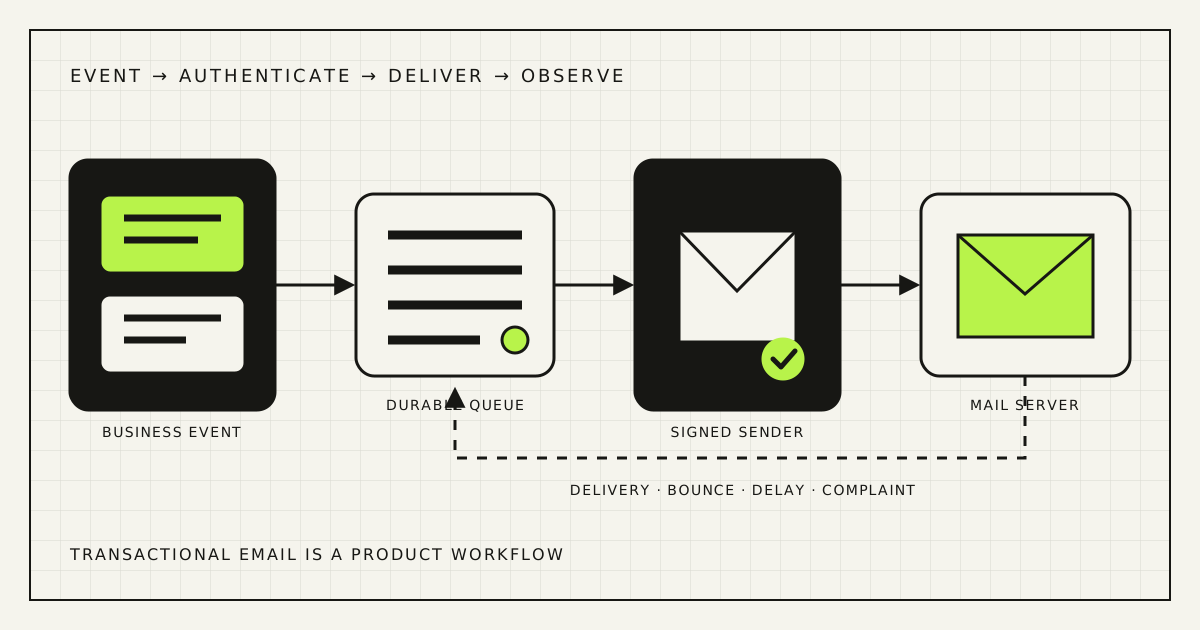
Do not start by rewriting the subject line. First prove that the application created the message, sent it through an authenticated domain, received the provider events, and gave the customer another way to complete the task. SPF, DKIM, and DMARC are necessary controls, not a complete delivery system.
Define what “not received” means
An email crosses several systems. “The provider says delivered” normally means the recipient mail server accepted the message. It does not prove inbox placement, display, or reading. Conversely, a customer may report no email when the application never queued one, the address contains a typo, a previous hard bounce suppressed the recipient, or a link expired before use.
| Stage | Evidence to inspect | Typical failure |
|---|---|---|
| Business event | Order, account, invoice, or form record | Workflow never triggered |
| Queue | Job ID, enqueue time, attempts | Worker stopped or job expired |
| Provider | Message ID and API response | Rejected request or wrong configuration |
| Recipient server | Delivered, deferred, bounced, complained | Authentication, reputation, policy, or bad address |
| User action | Safe domain event: confirmed, reset, downloaded | Spam folder, expired link, confusing message |
Give support one lookup that starts with an order number or account ID and shows this chain without exposing message content unnecessarily. The useful answer is “queued at 14:03, accepted by the provider, deferred twice by Outlook, delivered at 14:11; resend available,” not “our email service is working.”
Inventory every sender before editing DNS
A small company rarely has one sender. Google Workspace or Microsoft 365 sends staff mail; the website sends form notices; Shopify or WooCommerce sends order updates; a payment service sends receipts; the CRM sends sequences; support sends tickets; an invoicing platform sends documents. One forgotten system can break a strict DMARC rollout.
Create a sender register with owner, purpose, visible From address, envelope or return-path domain, DKIM signing domain, provider, sending method, approximate volume, recipient type, and bounce destination. Search DNS and vendor accounts, but also inspect real message headers. Documentation and reality often differ.
Sender: store application
Purpose: order confirmation, fulfilment, refund
Visible From: orders@example.com
Return path: bounce.tx.example.com
DKIM domain: tx.example.com
Provider: [name]
Event owner: ecommerce team
Bounce/complaint webhook: [endpoint]
Fallback: order status page + resend
Do not publish a DMARC reject policy until legitimate senders are identified and aligned. A report-only period is useful because DMARC aggregate reports expose sources using the domain, but the reports need an owner who can classify them. “We collect XML files” is not monitoring.
Meet current mailbox-provider rules
The baseline has tightened. Gmail’s current sender guidelines require all senders to use SPF or DKIM; senders of more than 5,000 messages per day to personal Gmail accounts must use SPF, DKIM, and DMARC, align the visible From domain, use TLS, and meet additional infrastructure and spam-rate requirements. Gmail applies the bulk classification to the primary domain and says the status does not expire simply because volume later drops.
Yahoo’s Sender Hub likewise requires at least SPF or DKIM for all senders and adds SPF, DKIM, DMARC alignment, easy unsubscribe for marketing and subscribed messages, complaint limits, and valid DNS for bulk senders. Yahoo’s FAQ distinguishes transactional messages such as order confirmations and password resets from the one-click unsubscribe requirement. Do not add an unsubscribe link to a security message merely to imitate a newsletter.
Microsoft announced comparable SPF, DKIM, and DMARC requirements for domains sending more than 5,000 messages per day to Outlook.com consumer addresses, with non-compliant high-volume mail subject to rejection. The official Outlook announcement covers outlook.com, hotmail.com, and live.com—not every Microsoft 365 tenant.
The practical conclusion for a small sender is not “the 5,000 threshold does not affect us.” Authenticate all production mail, keep infrastructure valid, and monitor reputation now. Provider requirements are minimum admission rules, not a promise of inbox placement.
Fix SPF, DKIM, and DMARC as one system
- SPF: authorise the systems that use the envelope sender domain. Keep one SPF policy per domain and remove services that no longer send.
- DKIM: make every active service sign outgoing mail with a domain you control. Verify the signature on a received message, not only in a vendor dashboard.
- DMARC: require the visible From domain to align with a passing SPF or DKIM domain, publish a reporting address, and move policy gradually after legitimate traffic is understood.
- DNS and transport: confirm valid A and PTR records where you operate sending IPs, consistent hostnames, and TLS. Managed email providers usually own part of this layer.
DMARC’s original specification is often misunderstood: it adds alignment, receiver policy, and reporting on top of SPF and DKIM. A message may pass SPF for a provider domain yet fail DMARC because that domain does not align with the address the customer sees.
Begin with p=none only as an observation stage, not a permanent badge. Classify every source, align or remove it, test forwarding and vendor edge cases, then move a controlled percentage to quarantine and reject when the evidence supports it. Never copy a DNS record from a generic tutorial: includes, selectors, return paths, and reporting addresses must match the actual providers.
Separate transactional and marketing streams
An abandoned campaign list should not endanger password resets. Use distinct provider streams and, where appropriate, related subdomains such as tx.example.com and news.example.com. Keep the visible identity recognisable, reply handling intentional, and DMARC alignment correct.
This is not folklore. Amazon SES recommends separate subdomains for marketing and transactional mail because each can build a distinct reputation. Separate suppression and monitoring policies too: a marketing complaint should stop marketing to that person, while a legally or operationally necessary order update may follow a different rule. Confirm the lawful basis and customer expectation for each category.
Do not create a new subdomain every month. Stability matters. Choose a durable sending architecture, warm meaningful volume gradually, and avoid sudden changes of domain, provider, IP strategy, From name, and cadence at the same time.
Build a durable sending pipeline
Sending email inside the checkout request makes customer experience depend on an external network call. A better pattern records the business transaction first, writes an outbox event in the same durable operation, and lets a worker deliver it. The customer sees a successful order only when the order is safely stored—not when Gmail accepts a message.
Business record → durable outbox or queue → template and locale → provider → signed webhook → status timeline → alert or recovery.
- Use a stable event ID so retries cannot create duplicate confirmations.
- Retry temporary failures with backoff; do not retry permanent address failures forever.
- Store provider message IDs and correlate every webhook to the business event.
- Verify webhook signatures and make webhook processing idempotent.
- Keep templates versioned so support can identify what the customer was sent.
- Redact secrets and minimise personal data in logs.
WordPress sites should not rely on an unobserved local mail function for critical messages. Use a reputable transactional provider or correctly managed mail server, authenticate the chosen domain, and make plugin or application failures visible. Installing an SMTP plugin changes the route; it does not automatically fix sender alignment, bounces, duplicates, or monitoring.
Design templates for the task
A password reset is not a miniature campaign. State why the message arrived, name the service, put one primary action first, show link expiry, explain what to do if the request was not made, and offer a safe support route. Do not include unrelated promotional blocks that confuse classification and the user.
Order messages should include the order identifier, accurate items and amounts, fulfilment state, next step, and a link to a secure status page. Render both HTML and readable plain text. Use absolute HTTPS links on owned or clearly expected domains. Keep the From name and domain stable, and monitor replies if the message invites them.
Localise operational language, not only headings. Ukrainian customers should receive natural status, delivery, payment, and support terms; the Russian edition should be edited independently. Preserve order numbers, dates, currencies, time zones, names, and address formats correctly. The Rendframe online-store launch guide covers the wider checkout, payment, delivery, and QA flow.
Process delivery feedback
Provider event documentation makes the operational categories clear: delivery, delay, bounce, complaint, rejection, and unsubscribe are different states. Record them. A hard bounce should suppress repeated attempts until the address changes or is safely verified. A temporary delay should remain visible and retry according to policy. A complaint requires immediate investigation of message type, consent, and source.
Monitor per stream and provider: accepted requests, time from business event to provider acceptance, delivery delay, hard bounce rate, complaint rate, webhook lag, queue depth, oldest unsent event, and completion of the user action. Open tracking is not a reliable proof of reading and may be inappropriate for sensitive messages.
Alert on absence as well as spikes. If a store normally sends confirmations every hour, zero messages during active orders is an incident. If webhooks stop while sends continue, the dashboard can look calm precisely when observability has failed.
Give the user a recovery path
Email should confirm a transaction, not be the only place where the transaction exists. After checkout, show the order number and next step on the site. Let an authenticated customer view the order and request a controlled resend. For guest orders, use a safe lookup that does not reveal whether arbitrary addresses are customers.
Password recovery needs rate limits, single-use expiring tokens, neutral responses that resist account discovery, and another support path for users who cannot access the mailbox. A resend should invalidate or safely coexist with earlier tokens according to a documented policy. Never ask support to forward a reset link manually.
For lead forms, persist the submission before sending internal notifications. Put new leads in a visible queue or CRM; email alerts are secondary. Otherwise one filtered notification silently becomes a lost customer.
Run the 12-point transactional email audit
- List every application, employee platform, CRM, payment tool, and vendor sending as your domains.
- Match visible From, return path, SPF, DKIM, and DMARC alignment using received headers.
- Separate transactional and marketing streams, owners, suppression rules, and metrics.
- Confirm provider, domain, and webhook credentials are owned by the business and recoverable.
- Move critical sends behind a durable outbox or queue.
- Add idempotency, bounded retry, dead-letter handling, and replay controls.
- Verify signed delivery webhooks and correlate them to the order, account, invoice, or lead.
- Process hard bounces, delays, complaints, and suppressions by message category.
- Test real templates across major and regionally important mailbox providers.
- Check mobile rendering, plain text, accessibility, locales, links, expiry, and reply handling.
- Create dashboards and alerts for queue depth, silence, delay, bounce, complaint, and user completion.
- Provide a secure status page, resend, or staffed fallback for every critical email action.
Run the test with newly created accounts and real production-like orders, then repeat after DNS, provider, template, or authentication changes. Use seed inboxes as a diagnostic sample, not as a universal inbox-placement score.
Frequently asked questions
Why are emails from my website going to spam?
Authentication may be missing or misaligned, but that is only one class of cause. Check the full path: event creation, queue, provider response, sender reputation, recipient quality, delivery events, template, and whether marketing shares the same stream.
Do SPF, DKIM, and DMARC guarantee inbox placement?
No. They establish authorised and aligned domain identity and let the domain publish policy and receive reports. Mailbox providers still make delivery decisions using reputation, complaints, infrastructure, content, recipient behaviour, and sending patterns.
What does “delivered” mean in an email dashboard?
Usually that the recipient mail server accepted the message. It does not prove that the message went to the inbox, appeared immediately, or was read. Connect provider states with the business action instead of treating delivered as the final outcome.
Should order emails have an unsubscribe link?
A purely transactional order confirmation or password reset is not the same as a subscribed marketing message. Keep the content limited to the requested or necessary transaction. Marketing email needs its own consent, preferences, and unsubscribe implementation under applicable rules and provider requirements.
Can an SMTP plugin fix WordPress email delivery?
It can route mail through a proper provider, which is often necessary. It cannot by itself inventory all senders, correct DNS and alignment, separate reputation, process bounces, prevent duplicates, monitor queues, or create a fallback for users.
Treat email as part of the product
The durable fix is not a DNS screenshot or a perfect spam-test score. It is a traceable workflow: the business event exists, the message is queued once, the domain is authenticated, provider feedback returns, failures are owned, and the user can still complete the task.
Rendframe can audit website and ecommerce email from application events through DNS, provider configuration, templates, webhooks, dashboards, and recovery flows. See Rendframe’s product engineering service or bring one failed order or reset example for a focused delivery audit.